
POP717 Download - Download POP717 App & Install Guide
Download the POP717 App for faster gameplay, instant notifications for Mysterious Mine, bonus alerts and one-tap login. This page explains how to download, install and update POP717 app on Android.
File: POP717.apk · Android · Free · Official link from admin panel
POP717 Download Screenshot Explanation

Explanation
On every POP717 page top you see a pink banner: Download our APP, win Super Prizes! with POP717 icon and Install button on right. Tap Install to start APK download. App users get faster loading, saved login, and app-only promotions like spin & gift campaigns.
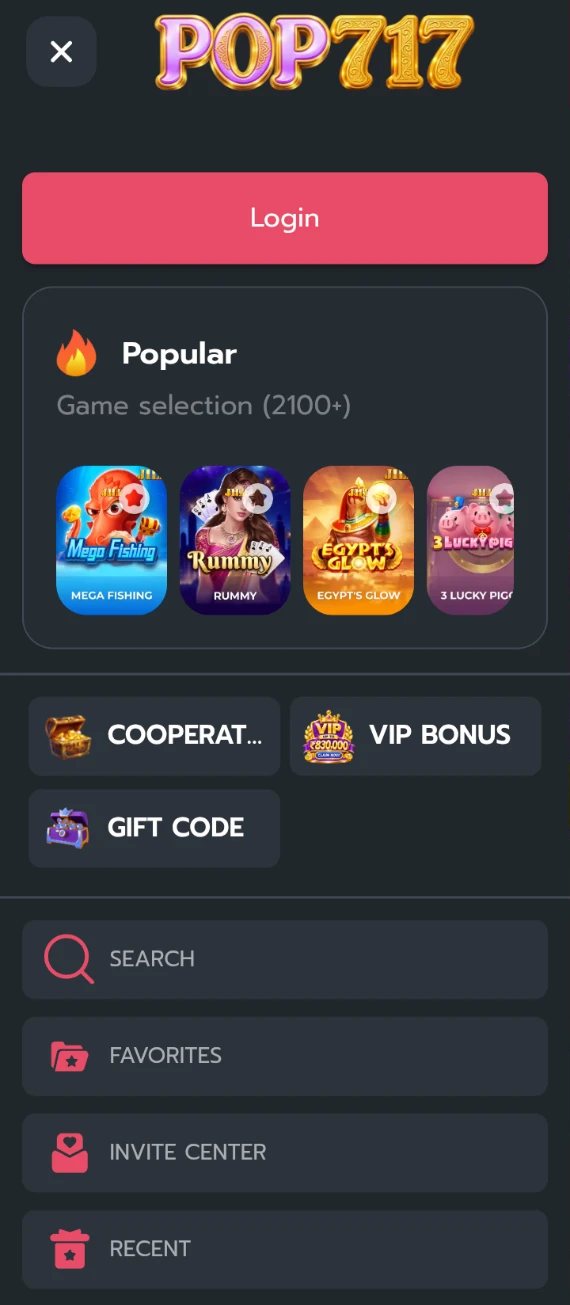
Explanation
Side menu (hamburger icon) shows Login button, Popular Game selection (2100+) - Mega Fishing, Rummy, Egypt's Glow, 3 Lucky Pig, plus Cooperation, VIP Bonus, Gift Code, Search, Favorites, Invite Center, Recent. Top right Install button also downloads the app.
How to Download POP717 App - Android
- Open pop717.lat/download.php - Or tap Install banner on POP717 website.
- Tap Download App / Install - APK file (POP717.apk) will start downloading. Use Wi-Fi for fast download.
- Open downloaded file - Go to Downloads / notification and tap the APK file.
- Allow installation - If Android shows "Install blocked / Unknown sources", go to Settings → Allow install from this browser (Chrome) → Allow.
- Install - Tap Install, wait 10-20 seconds, tap Open.
- Login or Register - Login with phone + password, or register new account in app.
- Allow notifications - So you get Mysterious Mine timing, bonus and withdraw alerts.
How to Download on iPhone / iOS
POP717 web version works fully on iPhone Safari/Chrome without APK. Open pop717.lat, tap Share → Add to Home Screen to create app-like icon. If official iOS app link is available, it will be shown on download page / inside account.
App vs Website - Which is Better?
| Feature | POP717 App | POP717 Website |
|---|---|---|
| Speed | Faster, saved cache | Fast, browser dependent |
| Login | Remember password, quick login | Login each time / remember option |
| Notifications | Yes - bonus, mine, withdraw | No push notifications |
| Download needed | APK install once | No download, instant play |
| Games & Bonus | Full 2100+ games, app bonuses | Full games & bonuses |
How to Update POP717 App
When a new version is available, app will show update popup on opening. Tap Update, download new APK and install over old app - your account, balance and login remain same. Do not uninstall before update unless support asks.
Download Problems & Solutions
| Problem | Solution |
|---|---|
| APK not downloading | Check internet, try again, use Chrome browser, clear cache. |
| Install blocked | Allow unknown sources for Chrome in Settings → Apps → Special access. |
| App not opening / white screen | Clear app cache, restart phone, reinstall latest APK from pop717.lat/download. |
| Old version login error | Update to latest POP717 app version. |
POP717 Download FAQ
Is POP717 APK safe?
Download only from official link on pop717.lat / inside your POP717 account. Do not download from random Telegram files.
What is POP717 app size?
App size is shown on download page and is usually lightweight for fast install on 4G/5G.